Subcontractor Punch List Tracking That Improves Accountability
By James Richardson, Founder of PunchOutPro
The real closeout bottleneck is not finding issues—it's getting the right subcontractor to own and clear them. When your electrician doesn't see the punch until the next morning, the plumber is already on site, and nobody documents who acknowledged what, closeout becomes a guessing game. PunchOutPro puts subcontractors in ownership of their punch items: they get notified directly, acknowledge in real time, and resolve with photo-backed proof—no more chasing trades across job sites.
The Problem & The Solution
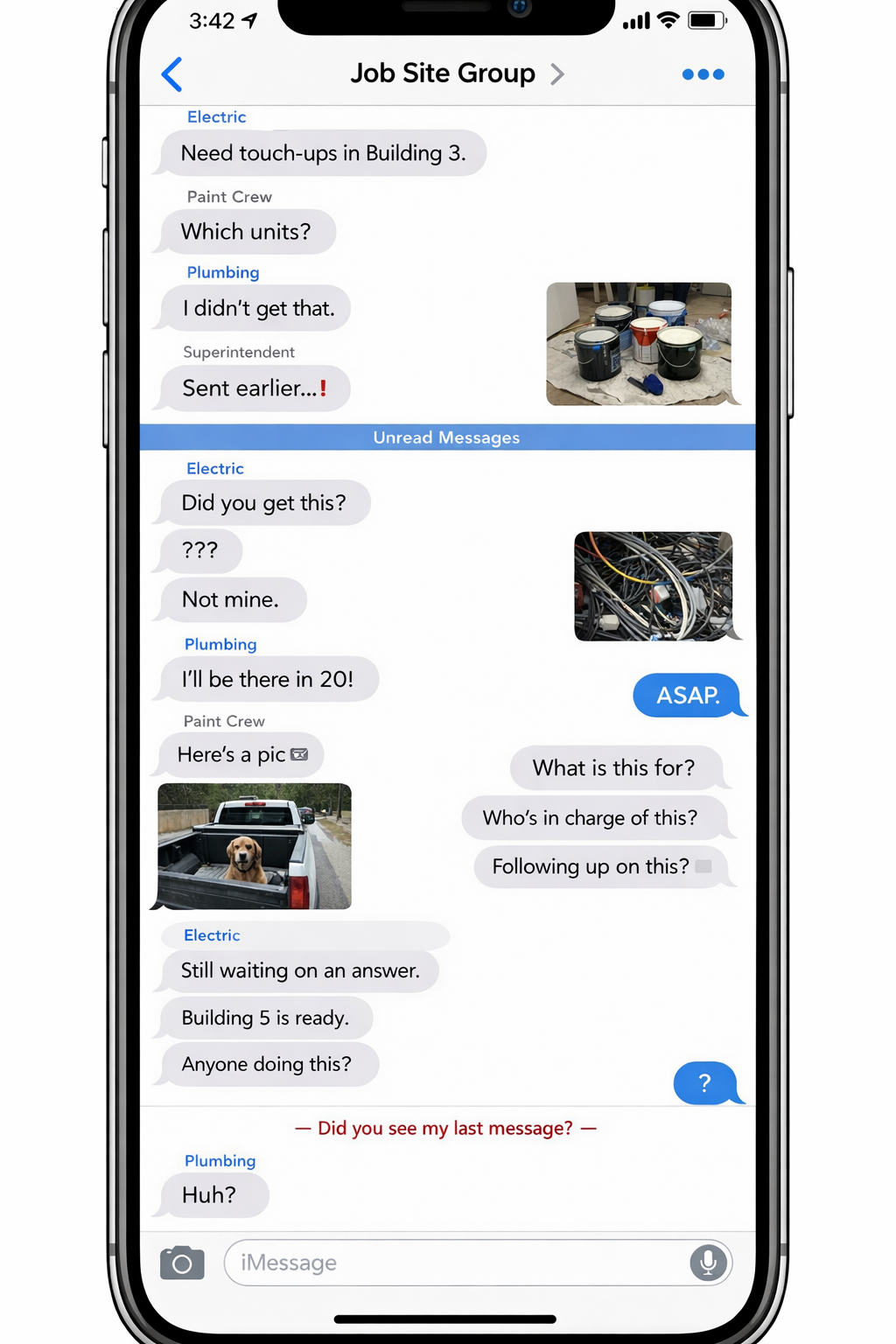
The subcontractor coordination problem: You text the plumber at 4:30pm. They don't see it until morning. By then a different crew is on site. Nobody knows who acknowledged what. Items get reworked because the fix was never photographed. Your super spends half their day chasing subs instead of managing the job.
What PunchOutPro delivers: Assign a punch item to a subcontractor with a photo and deadline. They get notified instantly (email, SMS, or app). They acknowledge the item, see the exact location and photo, and mark it complete with before/after proof. You verify in seconds. No chasing. No guessing. Full accountability trail.
Why Subcontractor Accountability Breaks Down
Closing out a job involves coordinating 6 to 10 subcontractors across multiple buildings, floors, and phases. Each trade works on their own timeline. The system you use to manage them—texts, emails, spreadsheets—determines whether they own the work or whether you chase them all day.
The Text Thread Problem
You text the electrician a punch list. They don't respond for 6 hours. You follow up. They claim they never got it. Two days later you find out they did the work but marked it in their own notes, not in your system. You have no photo. You have no timestamp. You re-do the inspection yourself.
Text threads are:
- Not searchable. A punch item from last week is buried under 50 new messages.
- Not owning items. Subs don't feel responsibility for an item they see once and forget about.
- Not auditable. If a dispute arises during final walkthrough, you have no proof of when the item was assigned, acknowledged, or resolved.
- Not photo-backed. Subs complete work and tell you verbally. You verify it yourself. If it fails inspection, you re-walk.
The Email Problem
You send the HVAC sub a spreadsheet with 28 punch items assigned to them. They open it once, skim it, then mark most items as "done" without actually doing them. You trust the email and move forward. During final walkthrough, 40% of the items are incomplete. You're now in a dispute about who was responsible and when.
Email workflows fail because:
- Information overload. Subs can't focus on specific items when they're buried in a spreadsheet.
- No real-time verification. You don't know a sub's status until you ask them directly. By then, the job has moved on.
- Weak acknowledgment. A sub opening an email isn't the same as taking ownership of the work.
- No photo chain of custody. You can't prove who did the work or what it looked like before and after.
The Coordination Friction Problem
You have 6 subs working on 3 buildings. The drywall crew finishes Unit 201, but the painter can't start until you assign them that unit. The electrician is waiting for final approval from drywall before they touch the walls. But nobody knows who's waiting for what. No central visibility. No clear ownership. Work stalls while you act as an intermediary.
The Closeout Documentation Problem
A final walkthrough finds unfinished work. The HVAC sub claims they completed the item two weeks ago. You have no photo. They have no photo. There's no timestamp, no location proof, nothing. Now you're arguing with them about whether it was ever done. The item goes back on the punch list. Closeout delays further.
The core issue: without a clear ownership trail and photo documentation, you're managing by hope and memory, not by evidence and accountability.
How Punch Coordination Breaks Down Without Structure
Most teams start with good intentions. You create a detailed punch list. You assign items to subs. You expect them to take ownership and report back. Then reality hits.
Assignment Without Acknowledgment
You assign the plumber 12 items in Unit 203. They never confirm they got it. You assume they're working on it. Two weeks later you find out they never saw the assignment. Or they saw it, dismissed it, and forgot about it. No accountability mechanism. No consequence for non-engagement.
Work Without Proof
The tile sub completes a punch item. They don't photograph it. They don't document completion. They just assume you'll eventually verify it on a re-walk. If the photo shows the issue wasn't fully fixed, you have no clear record of what they claimed versus what they actually delivered. Dispute territory.
Status Without Visibility
The electrician is working on 45 punch items across 3 buildings. You don't know which ones they've started, which ones are blocked waiting for drywall, or which ones are ready for inspection. You guess. You call. They say "yeah, most of them are done." Most of them isn't good enough. You need exact status.
Rework Without Learning
A punch item gets reassigned because the first sub didn't complete it correctly (or at all). They blame unclear instructions. You blame their accountability. The item goes back on the list. Two weeks later it happens again with a different sub. No learning. No closure. Just friction.
How PunchOutPro Routes Work to Subs (And Gets It Back)
PunchOutPro is built around a single principle: assign clearly, acknowledge instantly, complete with proof, verify in seconds.
Step 1: Assign with Photo & Context
You snap a photo of a punch item (broken outlet, patched drywall, paint drip, etc.) and assign it to the electrician. PunchOutPro automatically captures:
- Photo timestamp — when you took it, to the second
- Location — which building, floor, unit
- Trade assigned — electrician, not someone else's responsibility
- Deadline — when you need it done
No ambiguity. The sub sees the exact issue in the exact location with an exact deadline.
Step 2: Notify Instantly
The electrician gets notified the moment you assign them the item. They don't rely on memory or text threads. They get an email (or SMS, or in-app notification) with:
- The photo of the issue
- The unit location (they know exactly where to go)
- The deadline (they know when you need it)
- A direct link to acknowledge (they confirm they got it)
Step 3: Acknowledge Ownership
The electrician clicks "I acknowledge this item" in the app or email. This is not "I opened an email." This is "I have seen the issue, I understand the location, and I own the completion." You now have a timestamped record: electrician acknowledged at 9:47am. This is accountability.
Step 4: Complete with Photo Proof
The electrician fixes the outlet. They snap a photo of the completed work in the app. PunchOutPro automatically records:
- The after-photo (with the same timestamp and location context)
- Time to completion (they assigned it at 9:47am, fixed it by 2pm)
- Their acknowledgment that it's done
This creates a complete chain of custody: before, acknowledgment, and after. No disputes. No re-walks required (unless you want them).
Step 5: Verify or Challenge
You get a notification that the electrician marked the item complete. You see the before/after photos side by side. You verify the fix matches the punch requirement. You either:
- Approve it (item closes, proof stays in file)
- Challenge it (item goes back to the electrician with specific feedback: "the outlet isn't fully flush" or "there's still paint drip on the edge")
This feedback loop is immediate. No re-walking the job to find the electrician and tell them the work wasn't acceptable. They see it in the app, fix it that day, and re-submit.
Multiple Trades, One Building, Real-Time Coordination
Here's how PunchOutPro scales to real multi-trade closeouts:
The Scenario: 3 Buildings, 6 Subs, 105 Punch Items
You're closing out a mixed-use project: Building A (40 units), Building B (35 units), Building C (25 units). You have 6 active trades:
Without PunchOutPro (Your Day)
8:00am — You walk Building A with your super and photograph 20 new punch items. You come back to the office and manually enter them into a spreadsheet, trying to remember which trade goes with which item.
9:30am — You email the electrician a spreadsheet. They don't respond.
10:15am — You call the electrician. They say they're at a different project. They'll "get to it next week." You have no way to confirm they understand the priority.
11:00am — You email the plumber the same spreadsheet. Same result.
2:00pm — The electrician texts asking "which unit was that broken outlet again?" You find the spreadsheet, track down the photo, and text it to them. Wasted 30 minutes.
4:00pm — You get a call from the plumber saying the bathroom in Building B is torn up and they can't access Unit 10. You didn't know there was a conflict. You spend an hour rescheduling three other subs.
End of day: 5 items fixed, 100 items still open, and you're exhausted from coordinating.
With PunchOutPro (Your Day)
8:00am — You walk Building A with your super and photograph 20 new punch items. You assign 5 to the electrician, 8 to the plumber, 7 to HVAC. All assignments are done in 5 minutes (point, click, assign).
8:05am — All three subs get notifications with photos and deadlines. The app forces them to acknowledge the items by end of day.
10:00am — You check the dashboard. Electrician has acknowledged 4 items, plumber has acknowledged 7, HVAC hasn't acknowledged yet. You see this in real time—no phone calls needed.
1:00pm — HVAC marks 3 items complete and uploads photos. You review them in the app. Two are good, one needs rework. You mark one approved, one complete-needs-rework, one pending.
2:00pm — HVAC sees your feedback and fixes the rework item within an hour. You approve it.
3:30pm — Electrician marks 4 items done. You verify them in bulk from your office desk. No re-walk needed—photos speak.
End of day: 12 items closed, 4 pending verification, clear status on all 105 items. You still haven't been chasing subs.
Real-Time Visibility Without Chasing Updates
The power of PunchOutPro comes from one place: your dashboard. Instead of asking "are those items done yet?" you simply look at your screen.
Filter by Trade
You see all 45 electrical items at once. You can see:
- Not Assigned Yet — items you photographed but haven't routed to the electrician (0 items)
- Assigned, Not Acknowledged — items you sent but the electrician hasn't confirmed (2 items, dated 3 hours ago—they might have missed it)
- Acknowledged, In Progress — items they're actively working on (12 items)
- Complete, Awaiting Verification — items they finished and uploaded photos for (8 items, ready for you to review)
- Complete & Verified — items you approved with full photo proof (23 items, done and filed)
At a glance, you know exactly where the electrician's work stands. No phone calls. No chasing.
Filter by Building or Unit
You want to know: "Is Building B ready for final walkthrough?" You filter by Building B and see:
- All 35 units
- All punch items across all trades
- Status breakdown: 24 closed, 8 in progress, 3 pending verification
You can see which units are close to complete, which trades are blocking them, and exactly what work remains. This is not a spreadsheet refresh lag—this is live data.
See Who's Stuck
An item is marked "acknowledged" but not progressing for 5 days. The system flags it. You can see which trades are blocked waiting for earlier work to finish (drywall punch waiting for framing inspection, for example). You can reach out proactively: "What do you need to move forward?"
See Adoption and Engagement
The plumber is not acknowledging their items. You can see this in real time—not on a re-walk or a phone call, but on your dashboard. You can nudge them directly: "I've assigned you 8 items in Building B. Please acknowledge by EOD." Accountability surfaces immediately.
Photo Documentation & Proof of Completion
The most dangerous moment in a closeout is the moment between when a sub says "it's done" and when you verify it. If there's a gap—missing photo, unclear location, no timestamp—you lose the chain of custody. Disputes happen. Rework gets reassigned.
PunchOutPro ties every punch item to photos. Not "photos of the issue," but photos of the exact before state, the exact location, and the exact after state.
Every Photo Carries Context
When you photograph a punch item in the app, it auto-captures:
- Timestamp — 2026-04-14 at 3:47pm
- Location — Building A, Unit 203, Bathroom
- Trade assigned — Electrician
When the electrician uploads a completion photo, it carries the same context plus their name and the completion date. If a dispute arises during final walkthrough, you have an unambiguous record: "This issue was identified on April 14, assigned to the electrician on April 14, and completed with photo proof on April 16." No interpretation needed.
Before/After Comparison
The dashboard lets you view the before photo and after photo side by side. In seconds, you verify:
- Is this the same location? (location context confirms yes)
- Is the issue actually fixed? (photos show before and after)
- Is the fix acceptable quality? (your judgment, based on clear evidence)
No guessing. No re-walk required. Accept or reject in seconds. Move on.
The Audit Trail
Every punch item has a complete timeline:
- Created: April 14, 3:47pm by Super Johnson
- Assigned to Electrician: April 14, 4:00pm
- Acknowledged by Electrician: April 14, 5:15pm
- Marked Complete by Electrician: April 16, 10:30am
- Verified by PM: April 16, 10:45am
This timeline is your defense against closeout disputes. If the electrician claims they completed it two weeks ago and you're seeing the completion date as April 16, the app shows the truth. If a building inspector questions why the work didn't happen sooner, you have evidence it was assigned and the trade acknowledged.
Free Subcontractor Access (Why Adoption Matters)
The biggest barrier to punch list adoption is friction. Most subs are balancing 5 projects. They won't download a new app, create an account, or pay a subscription. They'll just ignore it.
PunchOutPro removes the friction entirely.
Subs Don't Pay
Your team pays $59/month for the platform. Subcontractors get full access for free. No negotiation, no friction, no "but we don't have a PunchOutPro subscription." They're invited to your project and they're active the same day.
Subs Don't Need an App
They can access PunchOutPro from email. You send them an assignment. They click a link in the email, see the punch item with a photo, acknowledge it right there. No download. No app store. No new icon on their phone.
Subs Don't Need an Account
They don't create a PunchOutPro account. They're invited by email. They click "accept invitation" and they're in. One step. They see only their work—not your entire project, not other subs' items, just their 28 assigned items.
Subs See Only Their Work
The electrician logs in and sees 45 electrical items, filtered by priority and deadline. The plumber sees 32 plumbing items. No information overload. No confusion about whose responsibility is whose. Just their work, organized by location and deadline.
Why This Matters
When subs feel ownership—they see their work, they acknowledge it, they complete it with photos, they get immediate feedback—they engage. Adoption is nearly automatic. You're not fighting to get them to use the system. They're using it because it makes their job clearer and faster.
Subcontractor Accountability: Texts vs. Email vs. PunchOutPro
| Feature | Text Thread | Email + Spreadsheet | PunchOutPro |
|---|---|---|---|
| Clear Assignment | Buried in chat history | Spreadsheet row (might be wrong) | Photo with location, deadline, assigned trade |
| Instant Notification | Text delivered (not guaranteed read) | Email (often goes to spam) | Email + SMS + in-app notification |
| Acknowledged Ownership | Sub says "yep got it" (maybe) | No confirmation (you assume they read it) | Timestamped acknowledgment button |
| Status Visibility | Call them and ask | Manual email updates (hours/days lag) | Live dashboard showing all states |
| Photo Documentation | Photos scattered across phones and text | Manual file management (if any) | Auto-linked to item with timestamp & location |
| Completion Proof | Sub text: "done" (take their word) | Email claim (no visual proof) | Before/after photos auto-linked to item |
| Dispute Prevention | No evidence, dispute likely | Possible email chain (hard to reference) | Timestamped audit trail + photos |
| Final Verification | Re-walk the job (time sink) | Re-walk the job (time sink) | Review photos in app (5 minutes per trade) |
| Sub Adoption Friction | Low (just text) | Medium (email attachment management) | Very Low (free, no app, no account) |
Questions About Subcontractor Accountability
What if a subcontractor claims they completed an item but our team says it's not done?
PunchOutPro captures both the sub's completion photo and your verification status. If there's a dispute, you have timestamped evidence: the sub's before/after photos, the date they marked it complete, and your photos of what you found on re-walk. You can show the sub the photo and say "I see the issue in this photo—here's what needs to be fixed." They either accept the feedback or you have documentation of the dispute for your records.
How do we handle subcontractors who don't respond to assignments?
The system tracks acknowledgment. If a sub hasn't acknowledged their assigned items after 24 hours, you see it on your dashboard. You can send them a reminder directly from the app: "You have 8 items assigned in Building B that need acknowledgment by EOD." This creates accountability—they see the deadline and know you're monitoring. Most subs respond quickly once they realize the work is being tracked.
Can we assign multiple subs to the same punch item if it requires coordination?
Yes. You can tag a single punch item with multiple trades (e.g., drywall, paint, and trim all need to fix the same corner). Each trade gets notified and can acknowledge independently. You can see which trades have completed their portion and which are still working. This works well for coordinated work where multiple trades touch the same area.
Do subcontractors have to download an app to use PunchOutPro?
No. They can access everything via email. When you assign them a punch item, they get an email with the photo and a link to acknowledge. They click the link, acknowledge, and they're set. They can also use the mobile app if they prefer (available on iOS and Android), but email-only is fully functional.
How do we prevent subs from marking items complete when they're not actually done?
You verify completion via the before/after photos they upload. If the photos don't show an acceptable fix, you reject the item and send it back with specific feedback: "The outlet is still loose—it needs to be completely flush." The item stays open until you approve it. This forces subs to take completion seriously because you always verify before closing.
What if we need to reassign an item from one sub to another?
You can reassign items in the app in seconds. The original sub gets notified that the item was reassigned, and the new sub gets notified they have a new assignment. All history (photos, acknowledgments, previous attempts) stays with the item. This creates accountability—if a sub keeps failing to complete work, the history is visible.
Learn More About Subcontractor Punch Management
- How to Hold Subcontractors Accountable on Punch Lists — Best practices for sub coordination, acknowledgment workflows, and photo verification.
- Construction Closeout Software — Broader closeout strategies beyond punch lists.
- Punch List Software for Superintendents — Tools for managing multiple trades on complex jobs.
- Punch List Software vs. Spreadsheets — Why spreadsheets fail at subcontractor coordination.
- PunchOutPro Pricing — $59/month for unlimited subs and projects.
Stop Chasing Subcontractors
Assign punch items with photos, get instant acknowledgment, verify completion with proof. Start your free trial and see how much time your team saves when subs take ownership.
Start Free Trial