Construction Closeout Software for Punch List Control
By James Richardson, Founder of PunchOutPro
Construction closeout is where schedules compress and loose workflows get exposed. The final 10% of the project takes 30% of the time. Punch lists sprawl. Subcontractors scatter. Documentation disappears. PunchOutPro brings order to closeout chaos—organized punch tracking, photo-based proof, real-time status visibility, and export-ready reports so handoffs stay on track and CO documentation is bulletproof.
The Closeout Challenge
Why it matters: Closeout isn't just a punch list—it's a compressed phase where every day costs money, every re-walk kills momentum, and every missing photo creates liability. The owner needs proof. The lender needs documentation. The contractor needs speed. Scattered workflows and poor visibility kill all three.
What PunchOutPro delivers: One system where every punch item is photographed and timestamped, trades see their work in real time, verification happens in the field (not via email), status visibility is instant, and final closeout documentation is automatically compiled with full photo evidence. Your closeout timeline survives contact with reality.
What Construction Closeout Actually Involves
Closeout isn't punch lists alone. It's a multi-phase workflow that compresses weeks into days.
Phase 1: Final Walkthrough & Issue Capture
An inspector walks the completed project (or completed sections of it) and identifies outstanding work. For a 100,000 SF commercial project, this might yield 800–2,000 punch items. Items are categorized by zone, building area, or scope, and assigned to the responsible trade. Each item needs a description and ideally a photo to avoid disputes later.
Phase 2: Subcontractor Completion & Documentation
Trades execute the punch work. As they complete each item, they need to report it. Your team verifies the work—sometimes in person, sometimes via photo. The verification step is critical: if you don't capture proof of completion, you'll re-walk the same item two or three times. Every re-walk burns schedule budget.
Phase 3: Re-Walks & Quality Assurance
After the first round of punch work, your team conducts re-walks to verify trades completed work to standard. Items that fail re-walk go back to the trade as "rework." Items that pass are marked verified. You might cycle through 2–4 re-walks before all items are closed.
Phase 4: Owner Signoff & CO Documentation
Once your team is satisfied, the owner (or owner's representative) walks the project. They may identify additional items or request modifications. Once owner-approved, you compile a final punch list with photographic evidence of every item raised and resolved. This documentation is essential for:
- Certificate of occupancy (CO) applications
- Lender closeout reviews
- Warranty documentation
- Final payment and retainage release
- Dispute resolution (if issues arise post-handoff)
Phase 5: Handoff & Transition
Once CO is obtained and owner has accepted the project, you hand off operations manuals, warranties, and final documentation. All punch work must be closed, documented, and archived. Stragglers cost money and kill schedule. Missing documentation creates liability post-handoff.
Common Closeout Failures & Where They Happen
Most closeout problems stem from three root causes: scattered communication, slow re-walks, and missing proof.
Scattered Communication
Punch items tracked in email, text threads, or a shared spreadsheet means:
- No single source of truth. Four different people have four different versions of the punch list. Items get double-counted. Completed items somehow reappear.
- Subs don't know their work. A subcontractor gets a spreadsheet with 2,000 items and can't find their 47. They show up to re-walk unprepared, dispute findings, and blame poor communication.
- Status is always stale. A trade reports completion via text. You update the spreadsheet manually—but by then it's three hours old, other people are editing, and nobody trusts the data.
Slow Re-Walks
Re-walks kill schedule. If you're walking a 100,000 SF building with 800 punch items looking for a handful of failures, you're walking blind. Without real-time data on what's supposed to be complete, you might re-inspect items that are already closed. Or you miss items because the photo quality is bad or the location context is unclear. Either way, schedule slips.
Missing Proof
When disputes arise—or when the owner or lender questions whether a punch item was actually resolved—you need photographic proof. If punch items were logged via spreadsheet with no photo, or photos were stored in a separate drive with inconsistent naming, you can't quickly pull evidence. You re-walk again. You delay payment. You damage relationships.
Unclear Responsibility
In closeout, overlapping responsibilities create deadlock. Mechanical finished their scope, but there's an issue at the interface between mechanical and drywall. Who owns the punch item? Is it mechanical's rework or drywall's touch-up? Without clear ownership and visibility, the item bounces between trades and goes unfixed.
Poor Handoff Documentation
Many teams assume closeout documentation is optional. It's not. You need a complete record of:
- Every punch item raised (with date, photo, description)
- Who was assigned to it and when
- Completion date and photo evidence
- Verification date and who verified
- Any rework cycles
Without this, CO applications get delayed, lenders request additional documentation, and warranty claims become disputes.
How PunchOutPro Guides You Through Closeout
PunchOutPro is built specifically for the closeout workflow—from initial capture through final documentation.
Step 1: Create the Project & Define Scope
You set up your project in PunchOutPro and define the structure: building zones, areas, or systems (mechanical, electrical, plumbing, etc.). This takes 20 minutes for most projects. The system is now ready to capture punch items.
Step 2: Capture Punch Items with Photos
Your inspector walks the project using the mobile app. They photograph each punch item, tag it with a trade and area, and submit. Each photo is automatically:
- Timestamped (proving when the item was identified)
- Geo-tagged (pinpointing location)
- Organized by zone and trade (making it findable)
No spreadsheet data entry. No photo file management. Just capture and move on. By the end of the day, all punch items are in the system.
Step 3: Route Work & Notify Trades
Items are automatically routed to the assigned trade. Each trade gets a mobile notification with their work queue—only the items that belong to them. They see photos, location context, and priority. No information overload.
Step 4: Trades Complete & Report
Trades complete the punch work and photograph the result in the app. The before/after photos are automatically paired. Your QA person gets a notification and can verify the work in real time—from the site, without waiting for a re-walk. If the work isn't acceptable, they mark it for rework in seconds. If it's good, it's verified and closed.
Step 5: Re-Walks & Final Verification
Your team can see in real-time which items are still open, which are awaiting verification, and which have failed re-walks. You can schedule targeted re-walks focused only on problem areas instead of walking the entire project blind. Once items pass final inspection, they're marked complete with verification timestamp and photo. By the time you reach owner walkthrough, you've already validated all work.
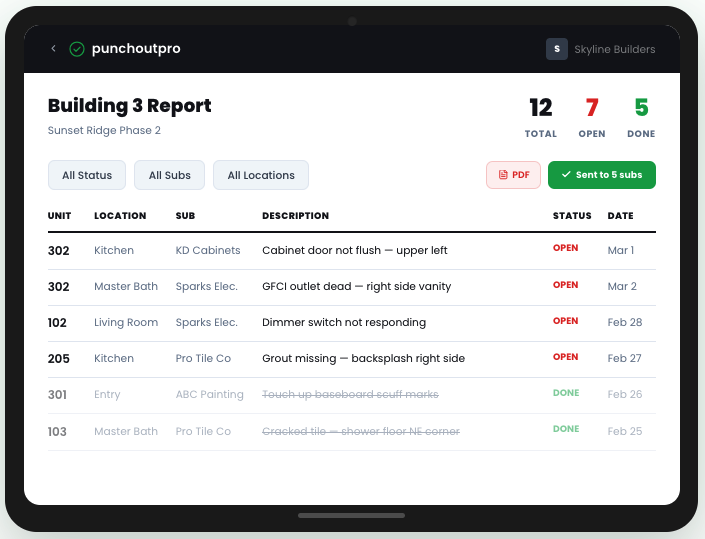
The result: a fully documented closeout punch list with photo evidence, timestamps, and audit trail. Perfect for CO applications, lender review, and warranty documentation.
See PunchOutPro Closeout Workflow in Action
Walk through a real closeout scenario on your own project. See how punch capture, trade routing, and verification work in 14 days, fully featured.
Start Your Free TrialFeatures Built for Construction Closeout
Photo-Based Punch Capture
Snap, describe, and route punch items on site. Every photo is timestamped and geo-tagged—no spreadsheet, no separate photo management.
Real-Time Trade Visibility
Subcontractors see only their assigned punch items, with photos and location context. They know what to do and by when.
Before/After Verification
Pair photos automatically as work is completed. Verify in the field, not via email chains. Instant status updates to the project team.
Intelligent Re-Walk Planning
See which items are still open, which are awaiting verification, and which need rework. Plan targeted re-walks instead of walking blind.
Complete Audit Trail
Every punch item captured, assigned, completed, and verified with timestamp and responsible person. Perfect for CO documentation and disputes.
Export-Ready Closeout Reports
Generate final punch lists with photos, timestamps, and sign-offs. Formatted for lender review, CO applications, and warranty records.
Why Mobile-First Matters in Closeout
Closeout moves fast. Your team is in the field, not at a desk. A mobile-first workflow keeps you ahead of schedule pressure.
Field Speed
Inspectors can capture and log punch items in seconds. No trip back to the office. No manual data entry. No delay between identifying an issue and getting it in the system.
Photo Quality & Context
Modern phones capture detailed photos instantly. With GPS and timestamp metadata, each photo becomes proof. You can't fake a timestamp. You can't dispute a geo-tagged photo.
Instant Notifications
When a trade completes punch work, your team gets notified immediately. You can verify from the site or dashboard in real time. You don't wait for emails or schedule separate verification walks.
Schedule Compression
Real-time visibility and verification mean fewer re-walks, faster closure, and quicker handoff. On a typical project, this saves 3–5 days in the closeout phase. At $5,000–$10,000 per day in overhead, that's ROI in the first week.
Reporting & Handoff: Documentation That Sticks
The final phase of closeout is documentation. You need proof. PunchOutPro captures it automatically throughout the closeout process.
Owner Walkthrough Support
When the owner walks the project, they'll find items that need attention. You can log these in real-time and route them to trades immediately. The owner sees the same system you do—full transparency on what's complete and what isn't.
CO Application Documentation
Building departments and municipal reviewers want evidence that punch work was completed to code. PunchOutPro exports a final punch list with:
- Every item identified (with date and photo)
- Work description and assigned trade
- Completion date and photo evidence
- Verification sign-off with timestamp
This documentation satisfies lender closeout requirements, CO applications, and third-party inspectors. Delays due to missing documentation disappear.
Warranty & Post-Handoff Protection
If an issue surfaces post-handoff and the owner claims it was a punch item you missed, you have proof. Your photo archive shows everything that was identified and resolved. Disputes are settled by evidence, not word-of-mouth.
Questions Closeout Teams Ask
Can we set up PunchOutPro mid-closeout if we've already started punch work?
Yes. You can start a PunchOutPro project at any stage of closeout. If you have existing punch items in a spreadsheet, we can help you import them. Most teams find the transition worthwhile: you immediately gain real-time visibility and accountability for the remaining punch work, which typically saves 2–4 re-walks.
How does PunchOutPro handle punch items that span multiple trades or zones?
You can assign a single punch item to multiple trades, or split it into individual items for each trade. For example, a corner with drywall, paint, and baseboard issues could be one item tagged to all three trades, or three separate items. Most teams prefer splitting for clarity: each trade owns their portion and completes it independently. The system allows both approaches.
What if subcontractors don't have smartphones or reliable on-site wifi?
Your team (superintendent, QA lead, or inspector) can photograph and log items on behalf of trades using your device. Trades can still verify completion via the app, or they can report completion verbally and your team verifies with a photo. It's less ideal than trade-driven entry, but it works and is still faster than spreadsheet management.
Can PunchOutPro integrate with our construction management system or BIM platform?
We offer API integration on our professional plan. You can push punch list data to Procore, e-Builder, or other CMS platforms, or pull snapshots for reporting. For most closeout projects, PunchOutPro works great as a standalone punch management tool. Integration becomes relevant if your broader project workflow requires data exchange with other systems.
How do we manage pricing if closeout tasks vary by project scope?
PunchOutPro pricing is project-based, not per-item based. You set up one project per building or scope, invite unlimited team members and trades, and capture unlimited punch items. The cost is fixed at $59/month, regardless of whether you have 200 punch items or 5,000. For most teams, a single project during closeout covers the full cost in efficiency gains alone.
What happens to our punch list and photos after closeout is complete?
Your data stays in PunchOutPro indefinitely. You have read-only access to completed closeout records, which is useful for warranty claims and post-handoff questions. If you need to export everything before canceling (punch list, photos, reports), you can—everything is exportable as PDFs or CSV. You own your data and can retrieve it anytime.
Learn More About Construction Closeout
- Punch List Software vs. Spreadsheets — Why software beats spreadsheets for closeout workflows, with cost analysis.
- Construction Closeout Checklist — A comprehensive punch list template to ensure nothing falls through the cracks.
- How to Manage Punch Lists on Multifamily Projects — Best practices for multi-building and large-scale closeouts.
- PunchOutPro Pricing — Plans for teams of any size. Free trial, no credit card, transparent pricing.