Construction Closeout Checklist
Construction closeout is more than punching walls. It's documentation, warranties, as-builts, subcontractor releases, MEP testing, certificate of occupancy prep, and the final punch walk — all compressed into the last 10% of your project timeline. This checklist covers every phase, so nothing gets missed.
Get the Free Checklist
Start with this comprehensive closeout framework and customize it for your next project.
Download Free Checklist (.pdf)Printable PDF. Works on any device. No email required.
What This Checklist Covers
6 closeout phases, 80+ line items, organized from pre-closeout documentation through final owner signoff. Built by GCs who've closed out multifamily, commercial, and institutional projects.
The 6 Phases of Construction Closeout
Construction closeout isn't linear—phases overlap and cycle. But organizing your work around these six phases keeps you from dropping items in the chaos of the final stretch.
1 Pre-Closeout Documentation
4–6 weeks before substantial completion
- Collect subcontractor warranties and guarantees
- Compile as-built drawings from all trades
- Gather O&M manuals for all installed systems
- Verify all equipment start-up reports are complete
- Confirm attic stock/spare parts inventory
- Submit final submittal log to architect
- Confirm all RFIs are closed
- Verify all change orders are executed and documented
2 MEP Systems Verification
3–4 weeks before substantial completion
- Complete HVAC test and balance (TAB) reports
- Verify fire alarm system testing and certification
- Complete fire sprinkler hydrostatic test
- Test emergency generator under load
- Verify elevator inspection certificates
- Complete plumbing pressure tests
- Confirm electrical panel schedules match as-builts
- Test all life safety systems (emergency lighting, exit signs, smoke detectors)
3 Punch List Walk & Resolution
2–4 weeks before substantial completion
- Schedule initial punch walk with owner/architect
- Document all punch items with photos, location, and responsible trade
- Distribute punch items to subcontractors with clear deadlines
- Track completion and verify with before/after photos
- Schedule re-walks for unresolved items
- Confirm all common areas and exterior are punch-free
- Generate punch completion report with photo evidence
4 Subcontractor Closeout
2–3 weeks before substantial completion
- Collect final lien waivers from all subcontractors
- Verify all subcontractor punch items are resolved
- Confirm subcontractor warranty start dates
- Collect consent of surety (if bonded)
- Process final pay applications
- Obtain subcontractor affidavits of payment (to their subs/suppliers)
5 Regulatory & Compliance
1–2 weeks before substantial completion
- Schedule final building inspection
- Obtain certificate of occupancy (or temporary CO)
- Verify ADA compliance walkthrough
- Confirm environmental compliance (if applicable)
- File notice of completion with local jurisdiction
- Verify all permits are closed
6 Owner Turnover & Final Signoff
At substantial completion and beyond
- Conduct owner training on building systems (HVAC, fire, security, etc.)
- Deliver all O&M manuals, warranties, and as-builts
- Deliver all keys, access cards, and security codes
- Walk common areas and representative units with owner
- Obtain owner's signed substantial completion certificate
- Confirm retainage release schedule
- Deliver final project record documents
- Schedule 11-month warranty walkthrough date
How to Use This Checklist
A printed checklist works best when you run it backward. Here's the workflow:
- Start with your target substantial completion date. Count backward 6 weeks. That's when Phase 1 kicks off.
- Assign owners to each phase. Your project manager owns Phase 3 (punch). Your MEP coordinator owns Phase 2. Your safety lead owns Phase 5. This distributes the load and creates accountability.
- Run closeout in weekly meetings. Spend 15 minutes each week walking through the active phases. Check boxes. Flag blockers. Move items forward.
- Don't wait for punch to start documentation. Phase 1 should begin 6 weeks out. Waiting until punch is done to collect warranties and manuals compresses your timeline to zero.
- Use photos as your primary verification tool. "Punch item resolved" means before/after photos attached. "Manual collected" means a copy is in your project file.
Where Checklists Work vs. Where They Don't
A printed checklist is excellent for organizing the macro closeout process. You can see all six phases at a glance, track them weekly, and keep your team aligned. But there's a hard limit where paper breaks down.
Phase 3 (Punch List Walk & Resolution) is where checklists hit their ceiling. Here's why:
- A checklist tells you "do punch walk"—but it doesn't track 2,700 individual items across 12 buildings.
- A checklist can't route items to specific trades or show completion rates by contractor.
- A checklist can't capture and organize photos at scale.
- A checklist can't tell you which items have been sitting open for 14 days.
- A checklist can't generate a punch completion report that proves to an owner you're done.
This is the hard truth: the checklist + PunchOutPro is the ideal combination. Use this checklist to organize your closeout phases 1, 2, 4, 5, and 6. Use PunchOutPro to manage phase 3—the individual punch items that will otherwise disappear into email threads and subcontractor confusion.
Scenario: 120-Unit Commercial Project
You're the GC on a 120-unit commercial mixed-use project with 12 subcontractors and an 8-week closeout window starting 6 weeks out. Here's how the phases stack up:
You start Phase 1 immediately: assign someone to collect warranties, manuals, and as-builts from each trade. Parallel track Phase 2: MEP testing runs while you're collecting documentation. By week 3, you're in the punch walk (Phase 3)—and this is where it gets loud. You're managing hundreds of items, dozens of re-walks, photo evidence, and contractor accountability. This is where a spreadsheet checklist maxes out. But if you have PunchOutPro, your punch coordinator can sort items by trade, see completion rates in real time, and generate a photo-backed punch report for the owner. Meanwhile, your project manager runs weeks 5–8 through phases 4, 5, and 6—lien waivers, permits, system training, final signoff. The checklist keeps all six phases visible. PunchOutPro keeps phase 3 from drowning you.
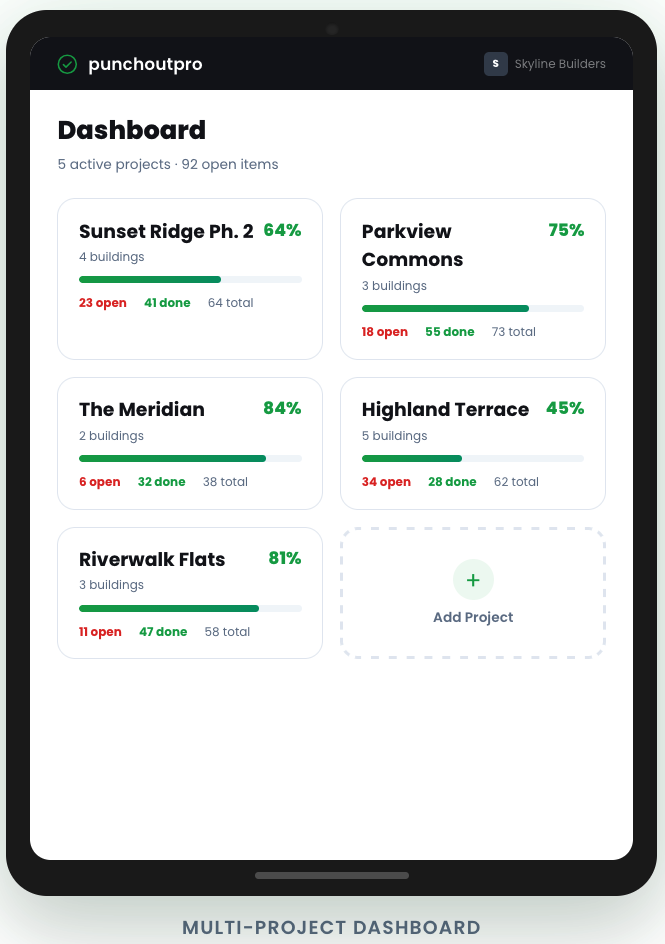
Automate Phase 3 of Your Closeout
PunchOutPro handles the hardest part—tracking, routing, and verifying every individual punch item with photos and accountability. The checklist handles the rest.
Start Free Trial Request a DemoFrequently Asked Questions
How far before substantial completion should I start this checklist? +
Start Phase 1 (Pre-Closeout Documentation) 6 weeks before your target substantial completion date. This gives you time to collect warranties, manuals, and as-builts without crushing your timeline. Don't wait. Most projects compress closeout to the final 4 weeks and regret it.
What's the difference between substantial completion and final completion? +
Substantial completion is when the building is ready for occupancy and the owner can move in or take beneficial use. Final completion is when all punch items, warranties, and project record documents are complete—typically 30–60 days after substantial completion. This checklist covers substantial completion primarily, with Phase 6 extending into the final completion window.
Do I need separate checklists for each building in a multifamily project? +
Yes and no. Use one master checklist for project-level closeout (permits, certificates, final documentation). Create a simplified version for each building if you have multiple buildings reaching substantial completion on different dates. But don't multiply work—use the same 6-phase structure and adapt it per building rather than starting from scratch.
What if the owner adds items during the final walkthrough? +
Treat them like any other punch item: document, assign, track, and verify. If items are substantial (cost + duration), request a change order. If they're minor, assign them to the responsible trade and set a deadline. Don't let the owner's final walkthrough become an untracked scope creep.
Can PunchOutPro track the full closeout process or just punch items? +
PunchOutPro is built specifically for phase 3 (Punch List Walk & Resolution). It tracks individual punch items, routes them to trades, captures photos, and generates completion reports. For the other five phases, use this checklist. Together, they cover the full closeout lifecycle.